Accepting a payment or first deposit
If your company takes card payments in EQ, your couple can pay by card in their EQ timeline once they've signed, or from an invoice you send. You can also record cash, checks and other payments yourself.
Before you start
- Card payments are part of Pro and need your Stripe account connected first. In EQ, go to More, then Payments, and tap Connect with Stripe. If it says card payments aren't switched on yet, contact support.
- Your receipt terms are saved. They are in the Console, under Money & contract rules. Ohio requires them on a deposit.
- The package has its deposit set. In Pricing, each package has a Retainer/deposit box. For a custom package the event has a Retainer / deposit field.
- The event has a total.
Steps: the couple pays by card
01Check the numbers
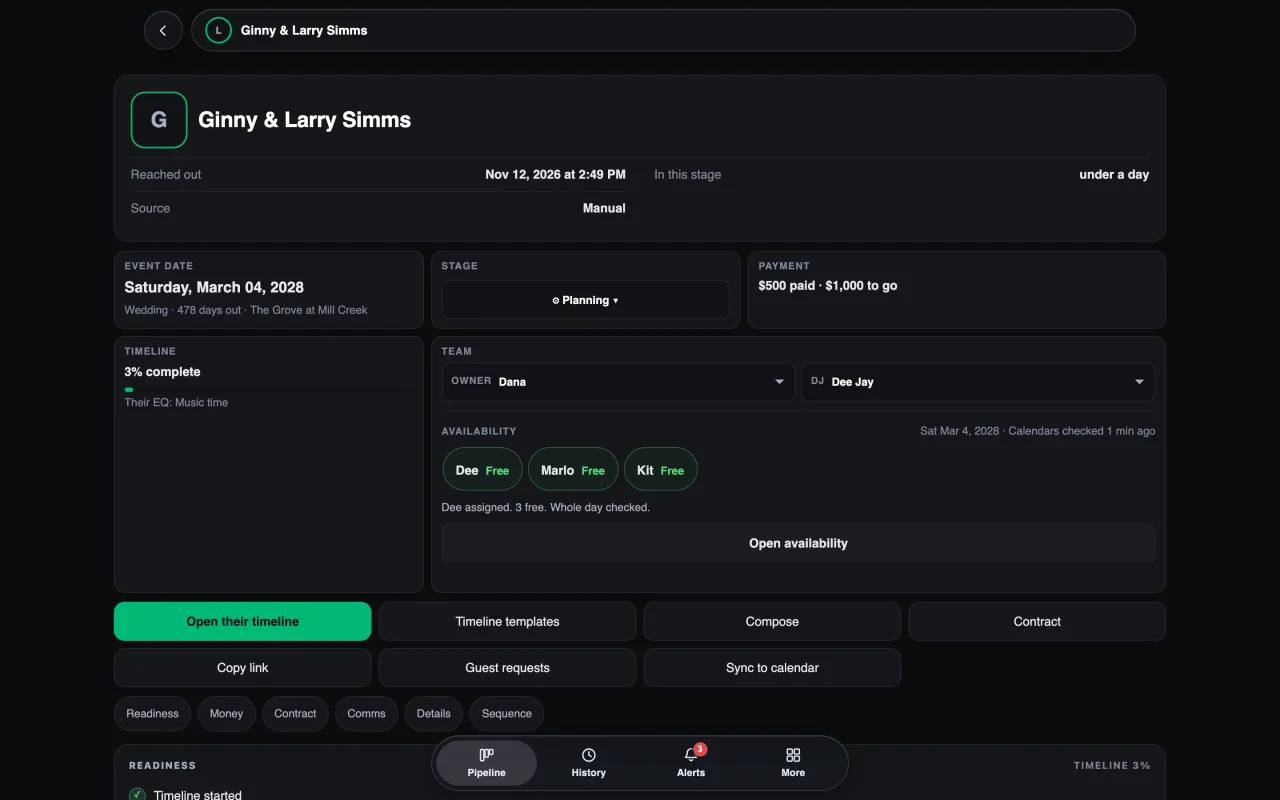
Open the client's workspace and find the Payments box. On a signed lead it reads "Ready to book? Booking needs a payment." On a booked client it shows Total, Paid and Balance. If Total is empty, type it. A small use $(amount) button offers the total from the package.
02Send the contract
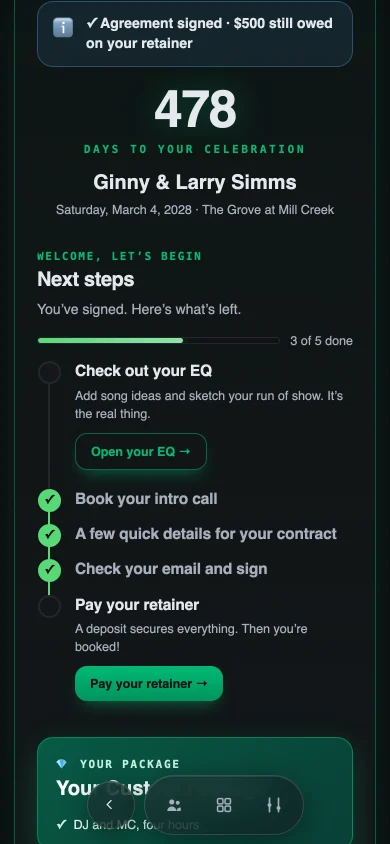
The couple signs on their phone (see the e-sign guide). In their EQ timeline, the next step is then "Pay your retainer: A deposit secures everything. Then you're booked!" with a Pay your retainer button.
03Or send an invoice
Open Invoices, press + New invoice, and pick the client. Choose the terms:
- Standard / Wedding builds a schedule with a retainer line ("Retainer (due at booking)") and a balance line due before the event.
- Net 30 is a single due date.
Press Create. On the invoice page press Generate PDF, then Send to client. The couple gets the email "Your invoice from (your company) (invoice number)".
04The couple pays
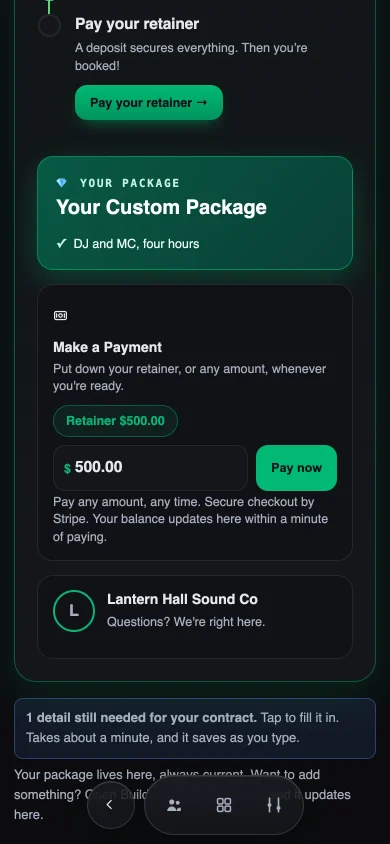
In their EQ timeline the couple opens Make a Payment ("Payments" once they're booked). Before their first payment it shows a Retainer $(amount) quick-fill, an amount box and a Pay now button. A note reads "Pay any amount, any time. Secure checkout by Stripe. Your balance updates here within a minute of paying." They pay on Stripe's page.
05You are told
You get a "Payment received" alert, in the app and by email: "(amount) from (couple)". The couple gets a receipt email, "Your receipt from (your company): (amount) paid (date)". The first payment on a booking gets the full first-deposit receipt with your refund and date-hold words.
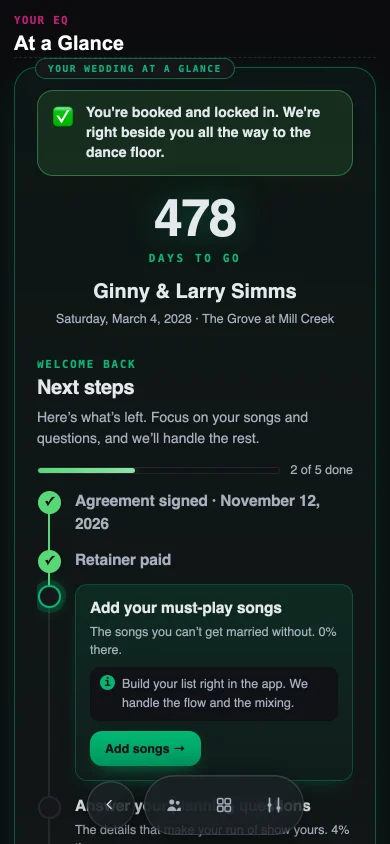
These demo screens use Ginny and Larry Simms, with sample planning details and a sample company. On your account they see your company name and your colours.
Steps: you record a payment yourself
06Record it
On a signed lead, enter the amount and date, pick a method (card, cash, check, transfer or other) and press Log payment. On a booked client, the methods are card, cash, check, Venmo, Zelle or bank, you can add a note, and the button reads Record payment.
07Decide on the receipt
On a booked client, Email a receipt is checked for a payment dated today. Leave it checked unless the client already has a receipt for this payment, for example a paper one you handed them. A payment dated before today starts unchecked, with the line "Leave this off only if the client already got a receipt for this payment." On a signed lead there's no check box: EQ holds the receipt for you on Receipts to send.
08See what became of the receipt
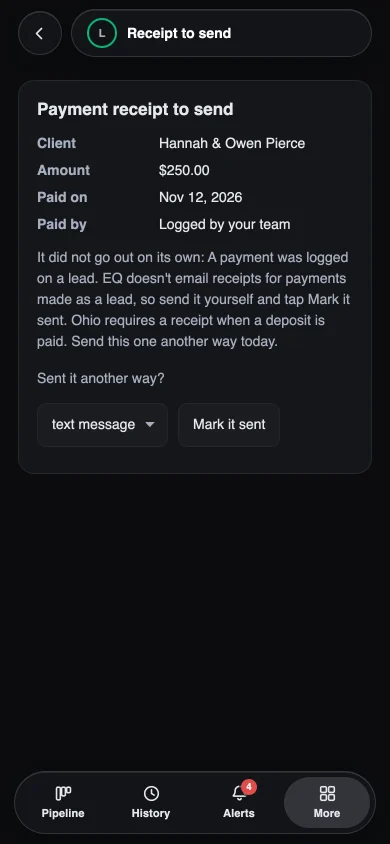
On a booked client, one line under Record payment says what happened: emailed to the client, waiting in your Gmail Drafts, or waiting for you on Receipts to send (see About receipts). On a signed lead, a line under the form reads "EQ doesn't email receipts for payments made as a lead. Send this one another way today, then mark it sent on Receipts to send." You also get an alert that names the couple and the amount.
09If the couple reschedules
Press Rescheduled booking. The next payment then gets a full first deposit receipt.
Scroll sideways to see the whole screen
About receipts
Payment receipts are on a short list of emails you cannot turn off, because clients should get a receipt for every deposit, and in Ohio the law requires one for deposits on weddings and private events. If you set a receipt to Draft, send it the same day. The Customizing your client emails and automations guide covers this.
When Email a receipt is checked, EQ always sends, drafts or holds the receipt. It never just drops it.
When EQ holds a receipt for you
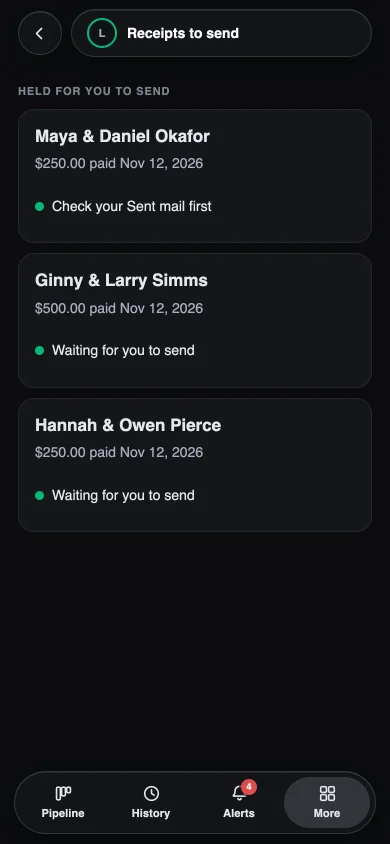
Sometimes EQ can't send a receipt on its own: the couple's emails are paused, the email on their record isn't one address, or the email didn't go out. Then the receipt waits on Receipts to send, under Held for you to send, and you get an alert that names the couple and the amount. Tap it to open the receipt.
Each receipt shows the client, the amount, the day they paid and who paid. Send the receipt now emails it. If you sent it another way, pick how (text message, paper, or another email) and press Mark it sent, so it leaves the list. If nobody marks it sent, EQ reminds you the next day.
When EQ can't tell whether it went out
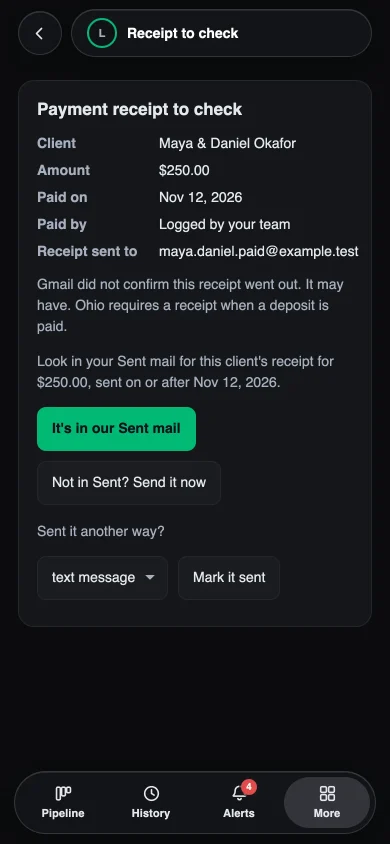
Now and then Gmail doesn't confirm that a receipt went out, even though it may have. EQ doesn't send it again on its own, so the couple never gets two. The receipt waits as Payment receipt to check.
Open it and look in your Sent mail for a receipt to the address under Receipt sent to, for that amount, sent on or after the day they paid. If it is there, press It's in our Sent mail. If it isn't, press Not in Sent? Send it now.
If something goes wrong
- No Pay button for the couple. Check that Stripe shows as connected, your plan is Pro, and the event has a total. With no balance owed, the couple sees "Nothing is due right now. If you would like to pay ahead, reply to any email from us and we will set it up."
- "Payment failed" alert. The alert names the couple and the amount. Ask them to try another card from their EQ timeline.
- An alert about a receipt. The alert names the couple and the amount. Tap it. If the receipt is waiting on Receipts to send, send it from there today. If it is a draft in your Gmail, send it from Drafts today. If EQ couldn't tell whether it went out, check your Sent mail first.
- A receipt went out without refund or date-hold words. Save your receipt terms in the Console, under Money & contract rules.
- The balance looks wrong. Look at the payment list in the Payments box. Email support@weddingeq.com if it still looks wrong.
Questions?
Email support@weddingeq.com. Our target is a reply within 1 business day. More answers are in the FAQ, and every guide is in Help.